
Overview: The Exclusive Pebble Chair Reward
The Pebble Chair is one of the most coveted decorative furniture items in Loftia. Named after the game’s adorable chinchilla mascot, this plush, cloud-soft armchair provides an innate +15 Cozy Rating to any floating island home interior, boosting your daily resting stamina recovery.
This guide explains how to invite friends, link your website credentials, and collect your rewards in-game.
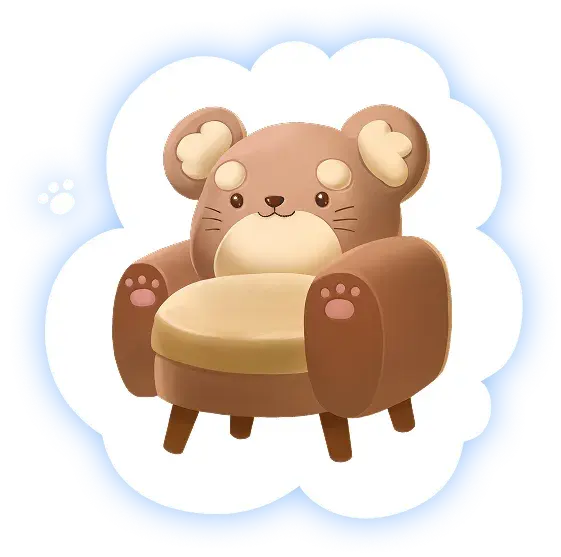
Official Render: The exclusive Pebble Chair plush armchair reward.
Step-by-Step: How to Claim Your Pebble Chair
Step 1: Check Your Website Referral Milestone
The Pebble Chair is granted as a special bonus for players who referred friends to the official Loftia pre-registration campaign:
- Navigate to the official website at
loftia.gg. - Log into your account dashboard.
- Verify that at least 1 referral invitation has registered under your link. Once fulfilled, your status will display "Reward Ready: Pebble Chair".
Step 2: Link Your Website Account In-Game
Once you enter Early Access, your Steam or Epic Games client needs to know which web account holds your rewards:
- Launch Loftia and complete character customization.
- Press
Esc(or the Menu button on controller) to open the Settings Menu. - Select the Account & Community tab on the left sidebar.
- Click "Link Website Account". The game will display an 8-character pairing code.
- Return to your browser on
loftia.gg/link, input the 8-character pairing code, and confirm. - A notification banner in-game will display: "Account Linked Successfully!".
Step 3: Collect from Your Homestead Mailbox
Unlike common store items, milestone rewards are delivered directly via the postal bird network:
- Head to your personal floating island parcel.
- Interact with the wooden Pebble Post Mailbox beside your front porch.
- Open the letter titled "Welcome Gift from Qloud Games".
- Click Claim Attached Items to place the Pebble Chair and crafting blueprints directly into your home decor inventory!
All Pre-Registration & 500K Community Rewards
| Reward Item | Unlock Requirement | In-Game Utility |
|---|---|---|
| The Pebble Chair | Refer 1 Friend via loftia.gg | +15 Home Cozy Rating; unique seating animation |
| Capybara Plushie Decal | 500,000 Global Wishlists Milestone | Decorative bed plushie and backpack charm |
| Rare Sky Basil Seed Pack (x10) | Pre-Registration Confirmation | Produces aromatic herbs worth +35 Dew each |
| Solarpunk Sunburst Glider Decal | Account Linking Day 1 Bonus | Custom cosmetic skin for your aerial glider wings |
Frequently Encountered Issues & Solutions
- "Reward Not Showing in Mailbox": If you just linked your account while in an active game session, simply log out to the character selection screen and re-enter your island to refresh server sync.
- "Referral Count Not Updating": Ensure your friend clicked the email verification link sent to their inbox after registering on loftia.gg. Unverified email addresses do not trigger the referral threshold.
- "Accidentally Trashed Pebble Chair": Do not panic! Once unlocked on your account, the blueprint is permanently recorded in your Crafting Table under the Exclusive Perks tab. You can re-craft another Pebble Chair using 5x Cloud Cotton and 2x Driftwood Planks.
Fact-Checking & Source Transparency
Information in this guide has been cross-referenced with official developer announcements from Qloud Games, the official Loftia website (loftia.gg), and public gameplay balance from beta milestones. If you spot discrepancies or want to suggest new community strategies, please consult our Editorial Policy.